CoinPoker HUD by Hand2Note: Your Competitive Edge

If you are going to play on CoinPoker, or are already a regular player in this room, you are probably thinking about the possibility of using a HUD at the tables. CoinPoker is one of the most successful and fastest growing sites in recent times. The good news is that CoinPoker officially allows the use of HUD.
Is HUD allowed in CoinPoker?
Yes. In the past, the room made a decision to ban the use of third-party software, but then the restrictions were lifted, which was announced in their official discord channel.

Therefore, we now recommend that you definitely use a HUD to keep up with other regulars and have an additional technical advantage over weak opponents.
What is the best HUD software to use for CoinPoker?
The best poker HUD software option for CoinPoker is Hand2Note. It is the most popular and advanced poker tracker, trusted by thousands of players. Head over to our Getting Started with Hand2Note article to start using Hand2Note with CoinPoker right now.

Hand2Note PRO is the ultimate version of the most advanced poker tracker. With it, you can improve your game and the quality of your analysis outside the tables.
What stats to focus on at CoinPoker
CoinPoker attracts a mix of recreational players and regulars, so your HUD should help you quickly identify player types. Here are the key stats to display:
- VPIP / PFR — the foundation of any HUD. On CoinPoker, you will find many players with VPIP above 40%, which signals weak opponents you can exploit.
- 3-Bet % — helps you understand who is fighting back preflop and who is passive.
- Fold to C-Bet — essential for deciding whether to continuation bet or give up.
- WTSD (Went to Showdown) — high WTSD means a calling station; low WTSD means you can bluff more effectively.
If you are new to HUD stats, check out our complete guide to poker HUD statistics for a full breakdown.
How to start HUD?
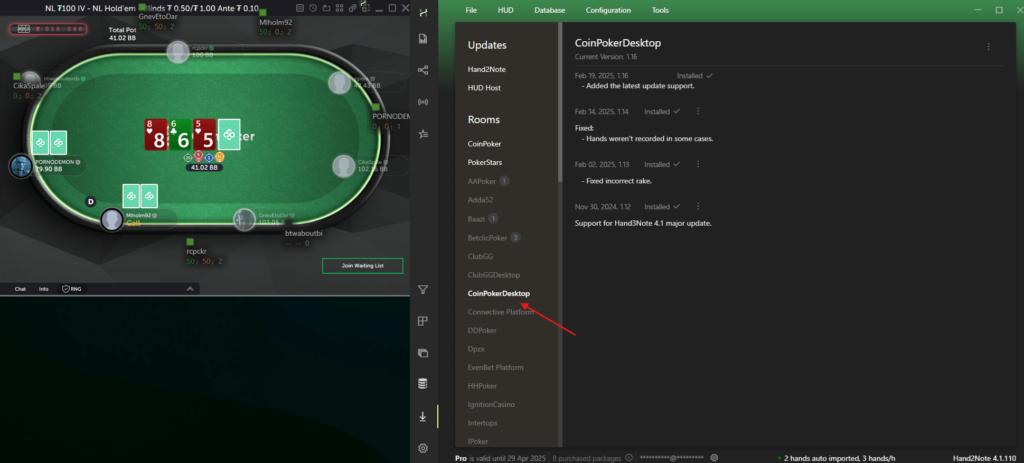
It is enough to simply launch Hand2Note and the CoinPoker table at the same time. The HUD should immediately be displayed on the opponents. If this does not happen, make sure you have installed all the latest updates to the app. And be sure to install the CoinPokerDesktop module.
Special recommendation from Hand2Note Support Team
To ensure everything works correctly on CoinPoker, we recommend opening tables one at a time and waiting 1–2 minutes for the HUD to appear before opening the next table. This allows Hand2Note to properly detect each table in the logs.
If multiple tables are opened simultaneously — especially with similar names (e.g., NL200 II, NL200 III, etc.) — they may receive the same internal index, which can cause identification issues.
If the HUD is still not appearing, check out our troubleshooting guide for HUD display issues.

We regularly publish new Hand2Note 4 guides on our Discord server.
Join Discord Server